WhatsGrow AI vs Respond.io (2026): Pricing and Features
Updated October 13, 2026 · Prices checked against each vendor's pricing page (sources at the bottom)
Respond.io is a mature omnichannel inbox priced per user plus monthly active contacts. WhatsGrow AI is WhatsApp-only with a built-in CRM pipeline, payment links and calling, priced on flat plans with no contact meter. Pick respond.io if you run many channels; pick WhatsGrow AI if WhatsApp is where the revenue is.
WhatsGrow AI · Growth
See pricing
10 agents · 25,000 contacts · no per-agent fee
Respond.io
$159/mo billed yearly (Growth, 10 users); $199 monthly
Published list price. Meta message fees extra on both.
No credit card · Cancel anytime
Which one should you choose?
Choose WhatsGrow AI if…
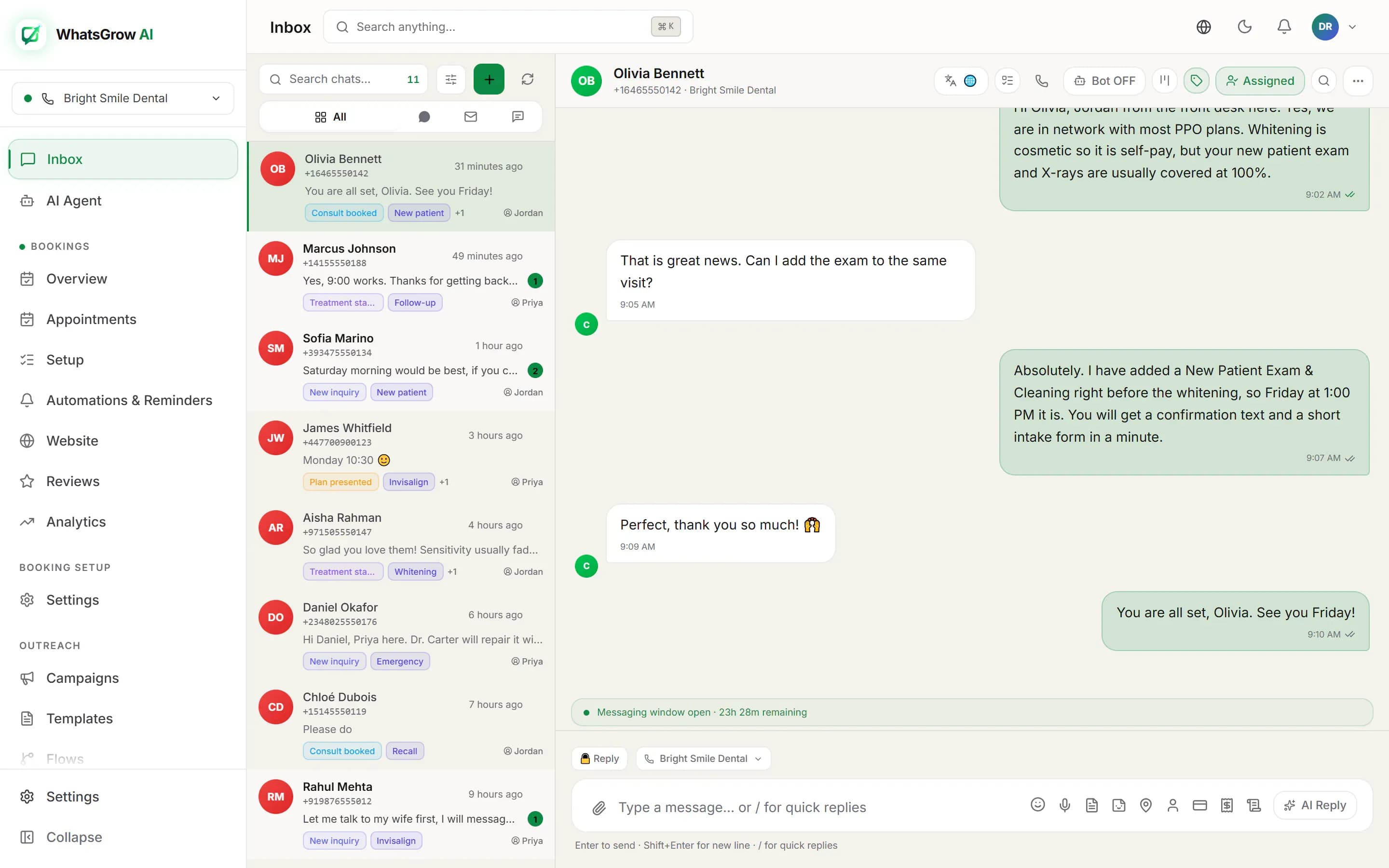
- WhatsApp is your main or only channel and you want the pipeline, tasks, payment links and calls in the same workspace as the chat.
- You want flat plans with a stated contact allowance (up to 25,000 on Growth, 100,000 on Pro) instead of a monthly-active-contact tier that you pick and get billed overages on.
- You sell in India, the Gulf or Pakistan and want Razorpay or Stripe links sent inside the conversation, plus AI that handles Arabic, Hindi and Urdu.
- You are an agency and need separate client workspaces with white-label options.
Choose Respond.io if…
- You need WhatsApp, Instagram, Messenger, Telegram, email and live chat in one inbox. Respond.io was built omnichannel from the start and WhatsGrow AI only does WhatsApp.
- You are a larger or enterprise team that wants an established vendor, unlimited seats on a custom plan, and a paid onboarding program.
- Your support operation already runs on respond.io workflows, routing rules and integrations, and the switching cost is higher than the savings.
- You want the AI Agents feature inside a tool your ops team already knows, and you are fine paying for AI credits.
Respond.io vs WhatsGrow AI pricing
Respond.io lists four plans on its pricing page: Starter, Growth, Advanced and Enterprise. Annual billing is cheaper than monthly, users are capped per plan, and monthly active contacts (MACs) are a separate tier you select. WhatsApp message fees are not included in any plan and are billed by Meta. WhatsGrow AI figures below are limits only; see pricing in your currency on our pricing page.
| Respond.io | WhatsGrow AI | |
|---|---|---|
| Entry plan | Starter: $79/mo billed yearly ($99/mo billed monthly), 5 users included, 5,000 AI credits | Starter: 3 agents, 1,000 contacts, 10 campaigns, 5 flows. 7-day free trial, no card |
| Plan with AI Agents | Growth: $159/mo billed yearly ($199/mo billed monthly), 10 users included, AI Agents, AI credits start at 10,000 | Growth: 10 agents, 25,000 contacts, AI knowledge base, groups and calls, payments |
| Higher tier | Advanced: $279/mo billed yearly ($349/mo billed monthly), 10 users included, AI credits start at 20,000 | Pro: 50 agents, 100,000 contacts, REST API, call recording |
| Extra seats | $12 (Starter), $20 (Growth) or $24 (Advanced) per extra user per month | Seats are set by plan limit; move up a plan for more agents |
| Contact billing | Monthly active contacts tier, 1,000 to 10,000+; overage listed at $12 per 100 MACs on Growth and $15 per 100 on Advanced | Flat contact limit per plan, no monthly-active meter |
| WhatsApp message fees | Not included in plans; Meta bills usage and you top up WhatsApp credit in the platform | Charged by Meta directly, not by WhatsGrow AI |
| WhatsGrow AI prices for you | — | Starter … · Growth … · Pro … |
Competitor prices as published on October 13, 2026; they change, so check the linked source. Our prices are shown in your local currency. Full details on the pricing page.
Is respond.io worth it for a small team?
Respond.io is a good product. The inbox is polished, the workflow builder is deep, and it handles WhatsApp, Instagram, Messenger, Telegram, email and web chat in one place. If you answer customers on four or five channels, that breadth is the reason to pay for it.
For a small team that only talks to customers on WhatsApp, a large part of that breadth goes unused. You still pay the per-user and per-contact structure, and the AI Agents feature sits on the Growth plan, not the cheapest one.
A fair rule: if fewer than two channels carry your leads, a WhatsApp-first tool with a pipeline built in will usually cost less and take less setup. If three or more do, respond.io earns its price.
respond.io pricing per user vs flat plans
Respond.io prices on three dials at once: the plan tier, the number of users beyond the included seats, and the monthly active contacts tier. On the published page, Starter includes 5 users, Growth and Advanced include 10, and extra users run from $12 to $24 per month each depending on plan.
Monthly active contacts are the part that surprises people. You choose a MAC tier from 1,000 upward, and the page lists overages of $12 per 100 contacts on Growth and $15 per 100 on Advanced. A good month of campaigns or a lead-gen ad burst can push you into overage even if your team size never changes.
WhatsGrow AI uses flat plans. Each plan has a stated contact limit and agent limit, so you know the ceiling before you start. The tradeoff is that you move to the next plan when you hit a limit instead of paying a small overage.
- Respond.io: price depends on plan, users above the included count, MAC tier, and AI credit use.
- WhatsGrow AI: price depends on plan only. Limits are published per plan.
- Both: Meta bills WhatsApp message fees separately.
Worked example: 5 agents and 2,000 monthly active contacts
Take a five-person sales and support team with about 2,000 contacts messaging them in a month, and a wish to have an AI agent answer first-line questions.
On respond.io, five users fit inside Starter ($79/mo billed yearly, $99/mo billed monthly), but AI Agents are listed as a Growth feature, so an AI-first setup points to Growth at $159/mo billed yearly or $199/mo billed monthly, with 10 users included. The MAC tier for 2,000 contacts is selected separately and the pricing page does not lay out exactly how each tier maps to each plan, so confirm the final figure in the checkout flow before you commit.
On WhatsGrow AI, five agents and 2,000 contacts fit the Growth plan (10 agents, 25,000 contacts, AI knowledge base, payments). Starter is enough only if you stay under 3 agents and 1,000 contacts. See pricing in your currency on the pricing page, and run the 7-day free trial with no card before you decide.
In both cases add Meta message fees. Meta moved to per-message pricing on July 1, 2025, charged on delivered template messages, while replies inside the 24-hour customer service window are free.
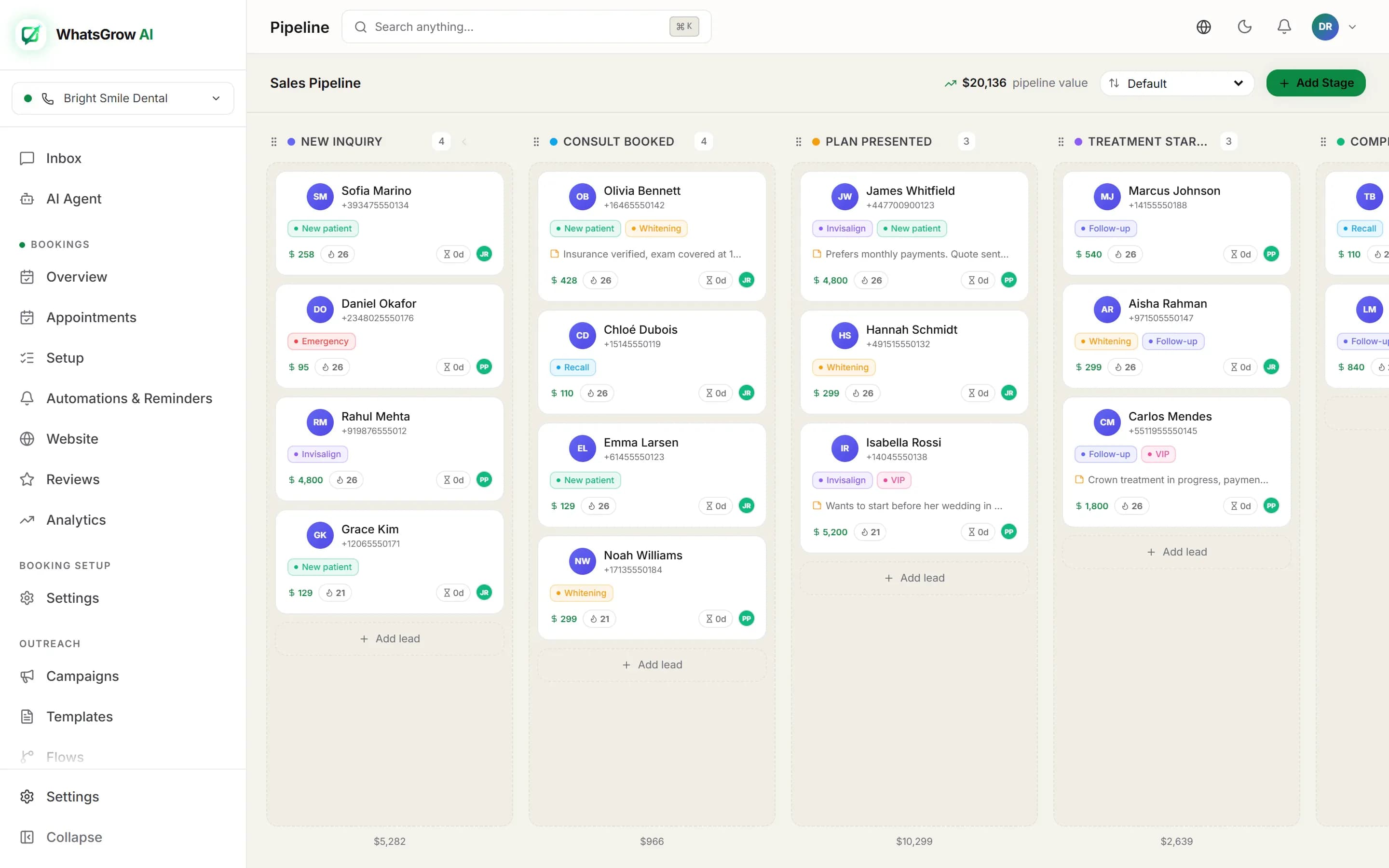
Does respond.io have a CRM pipeline and payments?
Respond.io tracks contacts, lifecycle stages and conversation status. Check its integrations list if you want it to feed an external CRM.
WhatsGrow AI puts a Kanban pipeline, deal values, tasks and assignment in the same screen as the chat, so a sales manager sees stage and revenue without leaving the inbox. It also sends Stripe or Razorpay payment links inside the conversation and moves the deal when payment lands, and it has built-in calling through Twilio or RingCentral.
If your team already pays for a separate CRM and wants the inbox to feed it, respond.io is fine. If you are trying to avoid a second tool, the built-in pipeline is the point.
respond.io AI Agents vs WhatsGrow AI agents
Respond.io meters AI through credits: 5,000 on Starter, 10,000 or more on Growth, 20,000 or more on Advanced, with extra credits listed at $15 per 1,000. That makes AI cost variable. A busy month costs more.
WhatsGrow AI agents answer from a knowledge base you upload, can update CRM fields, create tasks, move pipeline stages, send payment links and hand a chat to a human. Language coverage includes Hindi, Hinglish, Arabic and Urdu. Plans carry AI usage limits, so check the plan page for the allowance that matches your volume.
Neither tool replaces review. Whichever you use, read the first week of AI conversations and tighten the prompt and knowledge base before widening its scope.
When should I stay on respond.io?
Stay if you depend on multiple non-WhatsApp channels, if your enterprise contract includes SSO and unlimited seats, or if your agents are trained on its workflows and routing. Moving costs real hours, and the savings only matter if the bill is a real problem.
Consider moving if WhatsApp is 90 percent of your volume, if contact overages keep showing up on invoices, or if you are paying for a separate pipeline tool and a payment tool that a single WhatsApp CRM could replace.
Feature-by-feature comparison
Core
| Feature | WhatsGrow AI | Respond.io |
|---|---|---|
| WhatsApp inbox | ✓ | ✓ |
| Other channelsOnly relevant if you need multi-channel | Email and SMS; Instagram and Messenger in limited access | Instagram, Messenger, Telegram, email, web chat and more |
| AI agents | Every plan | Growth and above |
| Deal pipeline with values and tasks | ✓ | Lifecycle stages |
Payments and calling
| Feature | WhatsGrow AI | Respond.io |
|---|---|---|
| Payment links in chat (Stripe, Razorpay) | Growth and above | Not listed |
| Calling | Growth and above | Calls listed on plans |
Billing model
| Feature | WhatsGrow AI | Respond.io |
|---|---|---|
| Contacts | Flat limit per plan | Unlimited on Starter; monthly-active-contact tiers from Growth |
| AI usage | Token quota, or your own key | Credits; $15 per 1,000 extra |
| Extra users | Agent cap per plan | $12 / $20 / $24 each, yearly billing |
Price and trial
| Feature | WhatsGrow AI | Respond.io |
|---|---|---|
| 10 users included | Growth plan | Growth, $159/mo billed yearly |
| Free trial | 7 days, no card | 7 days, no card; no broadcasts |
Verdict
respond.io wins if you run many channels (Instagram, Messenger, Telegram, email, web chat) and need its enterprise maturity. If WhatsApp is where most of your revenue happens, WhatsGrow AI puts a deal pipeline, payment links and calling in the same workspace, on flat plans with no monthly-active-contact meter.
How to switch from Respond.io
- Export your contacts from respond.io as CSV, including tags, lifecycle stage and custom fields, and map them to WhatsGrow AI contact fields before import.
- Connect your WhatsApp Business number to WhatsGrow AI through Meta embedded signup. A number can be on one platform at a time, so schedule the cutover outside peak hours.
- Resubmit your message templates for approval in the new workspace and rebuild your two or three highest-volume workflows in the flow builder first.
- Run both tools in parallel on separate numbers for a week if you can, then move the main number and invite your agents.
- Upload your FAQ and policy documents to the AI knowledge base and review the first 50 AI replies before leaving it unattended.
Respond.io vs WhatsGrow AI: FAQ
How much does respond.io cost?
Respond.io lists Starter at $79/mo billed yearly ($99/mo monthly), Growth at $159/mo billed yearly ($199/mo monthly) and Advanced at $279/mo billed yearly ($349/mo monthly), plus Enterprise on custom pricing. Extra users and monthly active contacts are billed on top, and Meta bills WhatsApp fees separately.
Does respond.io charge for monthly active contacts?
Yes. You pick a monthly active contacts tier, starting at 1,000, and the pricing page lists overage of $12 per 100 contacts on Growth and $15 per 100 on Advanced. WhatsGrow AI uses a fixed contact limit per plan instead of a monthly-active meter.
Does WhatsGrow AI support Instagram or Telegram like respond.io?
No. WhatsGrow AI is WhatsApp only, built on the official Meta WhatsApp Cloud API. If you need Instagram, Messenger or Telegram in the same inbox, respond.io is the better fit and we would rather say so up front.
Is there a free trial for each?
Respond.io offers a 7-day trial with no credit card, which includes Growth features for 5 users and 1,000 monthly active contacts, without broadcasts. WhatsGrow AI offers a 7-day free trial with no credit card required.
Who pays the WhatsApp message fees?
You do, through Meta, on both tools. Since July 1, 2025 Meta charges per delivered template message by category and country, and, since 1 October 2026, replies inside the 24-hour customer service window are free only for the first 1,000 per business number each month. Respond.io has you top up WhatsApp credit in its platform, while WhatsGrow AI does not bill Meta fees.
Can I keep my WhatsApp number when I switch?
Yes. Your number moves with you, but it can be connected to one platform at a time. Disconnect it from respond.io, connect it through embedded signup in WhatsGrow AI, and resubmit templates. Plan the change for a low-traffic window.
Is WhatsGrow AI better for agencies?
For agencies running many client numbers, WhatsGrow AI offers separate client workspaces and white-label options on its agency setup. Respond.io also serves agencies, so compare both against your client count and how much branding control you need.
Sources
More on Respond.io and WhatsGrow AI
Try WhatsGrow AI on your own WhatsApp number
7-day free trial with full features. No credit card required.
Start free trial →