WhatsApp Campaigns

Bulk WhatsApp campaigns
that stay inside Meta's rules

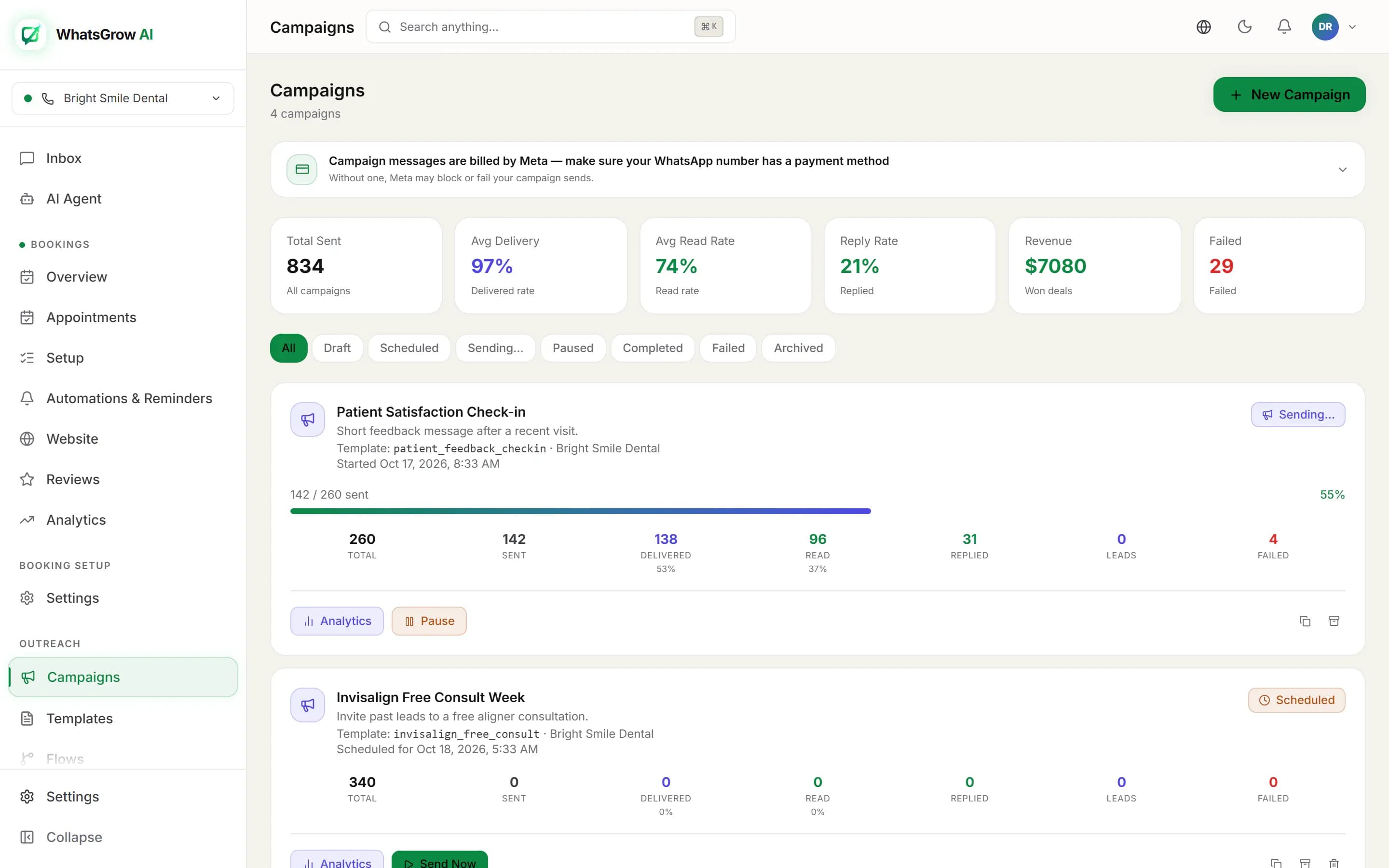
A WhatsGrow AI campaign sends one approved WhatsApp template to an audience you filter from your contacts, now or on a schedule, through the official Cloud API. Before launch it checks the template, the audience and the cost. After launch it shows who received, read and replied.

WhatsGrow AI campaigns dashboard listing broadcasts with sent, delivered, read and replied counts
The campaign list: sent, delivered, read, replied and leads for every broadcast.

From idea to sent in six steps

The New Campaign screen walks through these in order, then runs a preflight check before anything goes out.
  1. 1

    Pick the WhatsApp number and template

    Choose which connected number sends, then pick one of your Meta-approved templates. The review screen shows the template category and language so there are no surprises about billing.

  2. 2

    Fill the template variables

    Each placeholder takes a fixed text or a per-recipient value: name, first name, phone, email or any custom field, with a fallback for contacts who have none. If the template has an image or video header, add the media URL.

  3. 3

    Choose the audience

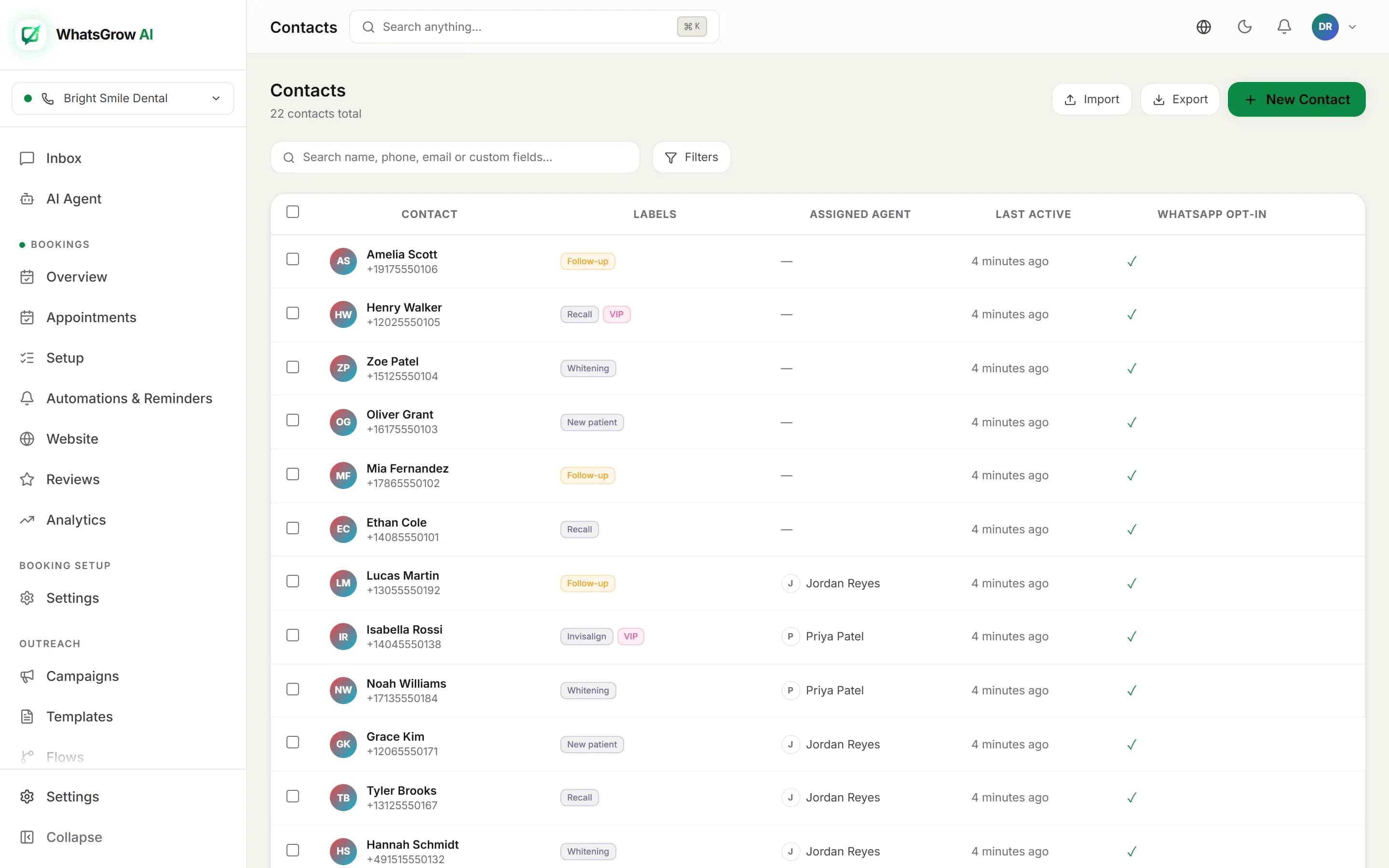
    Send to all opted-in contacts, to contacts with chosen labels, to a saved segment, or build custom filters: must-have labels, excluded labels, a pipeline stage, or only contacts with an open conversation.

  4. 4

    Optionally auto-label recipients

    Name a label such as "Summer sale 2026" and it is applied to every contact the campaign actually sends to, so you can follow up with the same group later.

  5. 5

    Send now or schedule

    Launch immediately or pick a date and time. Marketing campaigns that would land outside your quiet hours are held and sent when the window opens, not dropped.

  6. 6

    Run the preflight and launch

    Preflight scores readiness out of 100 and lists blockers and warnings. When it is green, launch.

What preflight checks for you

Mistakes in a broadcast cannot be recalled, so the check runs first.

Template status

Confirms the template exists in Meta and is approved, and that every variable has a value.

Who will really get it

Shows eligible versus skipped contacts, with skip reasons: opted out, blocked, duplicate phone numbers, and frequency cap where one applies.

Number health

Warns when your phone number’s quality rating is yellow and blocks the unwise when it is red, because Meta may restrict sends.

Cost and budget

Estimates cost by template category and recipient count. If you set a monthly budget cap and the send would exceed it, the check says so.

Quiet hours

Marketing templates are held outside your quiet hours (07:00 to 21:00 by default, adjustable) until the window reopens. Utility messages are not held.

Media reachable

Checks that your header media URL actually loads before 5,000 people get a broken message.

WhatsGrow AI contacts list with labels and filters used to build campaign audiences
Your campaign audience is built from the same contacts, labels and segments you use day to day.

Meta messaging limits, as of 13 October 2026

These come from Meta's messaging limits documentation, not from WhatsGrow AI. The limit is the number of unique people you may message outside a customer service window in a moving 24-hour period, and it is shared by all phone numbers in the same business portfolio.
LevelUnique people / 24hHow you get there
Starting limit250Where new business portfolios begin.
Tier 22,000Verify the business (or have your partner verify it), or deliver 2,000 template messages to unique numbers within 30 days using high-quality templates. Meta reviews and, if approved, raises the limit.
Tier 310,000Automatic: high-quality messages across your numbers and templates, and at least half of your current limit used in the last 7 days.
Tier 4100,000Same automatic rule. Meta says the increase happens within 6 hours when the conditions are met.
UnlimitedNo fixed numberSame automatic rule, from the 100,000 tier.

Two practical notes. Meta's page does not say that unverified businesses are capped at 250, only that verification is one route to 2,000, so check your own limit in WhatsApp Manager. And replies to customers who wrote to you in the last 24 hours do not count against this limit, since they are inside a service window.

What it costs on the Meta side

Our own plans are priced separately: see pricing for your currency.

After you hit send

Open any campaign to see where it stands and act on it.

Live counts and rates

Queued, sent, delivered, read, replied and failed numbers, plus delivery, read and reply rates calculated from them. WhatsGrow AI does not track link clicks.

Controls

Pause and resume a running campaign, cancel it, retry the failed recipients, duplicate it for next month or archive it.

Replies become leads

A reply adds the Campaign Reply label, creates a pipeline lead in your first stage and notifies the assigned agents. The list page even totals revenue from won deals.

Sends are paced rather than fired all at once, and temporary rate-limit responses from Meta are retried, so a large list drains steadily instead of failing in a burst.

Three campaigns that work

Restock alert for a fashion store

A bestseller is back in stock and 1,800 past buyers opted in.

  1. 1.Audience: label "Bought dress" and exclude label "Returned".
  2. 2.Utility or marketing template with the first name and the product image in the header.
  3. 3.Scheduled for 11:00 local time, auto-label "Restock June".
  4. 4.Replies become pipeline leads and the team closes in the inbox.

Appointment reminder for a clinic

Tomorrow’s patients need a reminder, and some should confirm.

  1. 1.Audience built from a segment of patients with a booking tomorrow.
  2. 2.Utility template with name and slot time through custom-field variables.
  3. 3.A Campaign reply flow handles "confirm" and "reschedule" replies.
  4. 4.Failed deliveries are retried once from the campaign page.

Webinar invite for a coaching business

Invite warm leads to a Thursday session.

  1. 1.Audience: pipeline stage Qualified, only contacts with an open conversation.
  2. 2.Marketing template with a registration link and a header image.
  3. 3.Preflight flags a budget cap hit, so you trim the list to the best 400.
  4. 4.Replies create leads and notify the coach.

Frequently asked questions

How do I send a bulk WhatsApp message without getting banned?

Use the official WhatsApp Business API, send only approved templates, message only people who opted in, and keep your quality rating healthy. WhatsGrow AI helps by excluding opted-out and blocked contacts, removing duplicate numbers and warning you before launch if your number’s quality rating is yellow or red. It cannot make a bad list safe: Meta judges quality by how recipients react.

Is a WhatsApp broadcast the same as a WhatsApp Business app broadcast list?

No. A broadcast list in the WhatsApp Business app only reaches people who saved your number and is capped at a small list size. A campaign here is a template message sent through the Cloud API to an audience you filter from your CRM, with delivery tracking per recipient.

How many contacts can I message in one day?

That depends on your Meta messaging limit, which is set at the business portfolio level. As of 13 October 2026, Meta’s documentation says new portfolios start at 250 unique contacts in a rolling 24 hours, and the limit scales to 2,000, 10,000, 100,000 and unlimited. See the table on this page.

Who pays for the messages?

Meta bills you for each delivered template message, at a rate that depends on the template category (marketing, utility or authentication) and the recipient’s country. That is separate from your WhatsGrow AI subscription. The campaign preflight shows an estimated cost, and you can set a monthly budget cap.

Can I send a campaign to people who have not opted in?

You should not. WhatsApp’s business policy expects consent before you send marketing messages, and the campaign audience only includes contacts marked as opted in. Sending to people who did not ask for it raises block and report rates, which lowers your quality rating and your limits.

What happens when someone replies to a campaign?

The reply is linked back to the campaign and counted. The contact gets a Campaign Reply label, a lead is created in the first stage of your pipeline if there is not one already, the conversation is assigned to the campaign owner and agents are notified. A flow with the Campaign reply trigger can also start.

Read more and related features

Our guide to bulk messaging on WhatsApp covers list hygiene and template writing in depth. Campaign replies feed straight into the CRM pipeline, and the comparison pages show how other broadcast tools differ.

Send a campaign people actually opened

Connect your number, pick an approved template and run the preflight. 7-day free trial.

Launch Your First Campaign