WhatsApp CRM Pipeline

A Kanban sales pipeline
inside your WhatsApp inbox

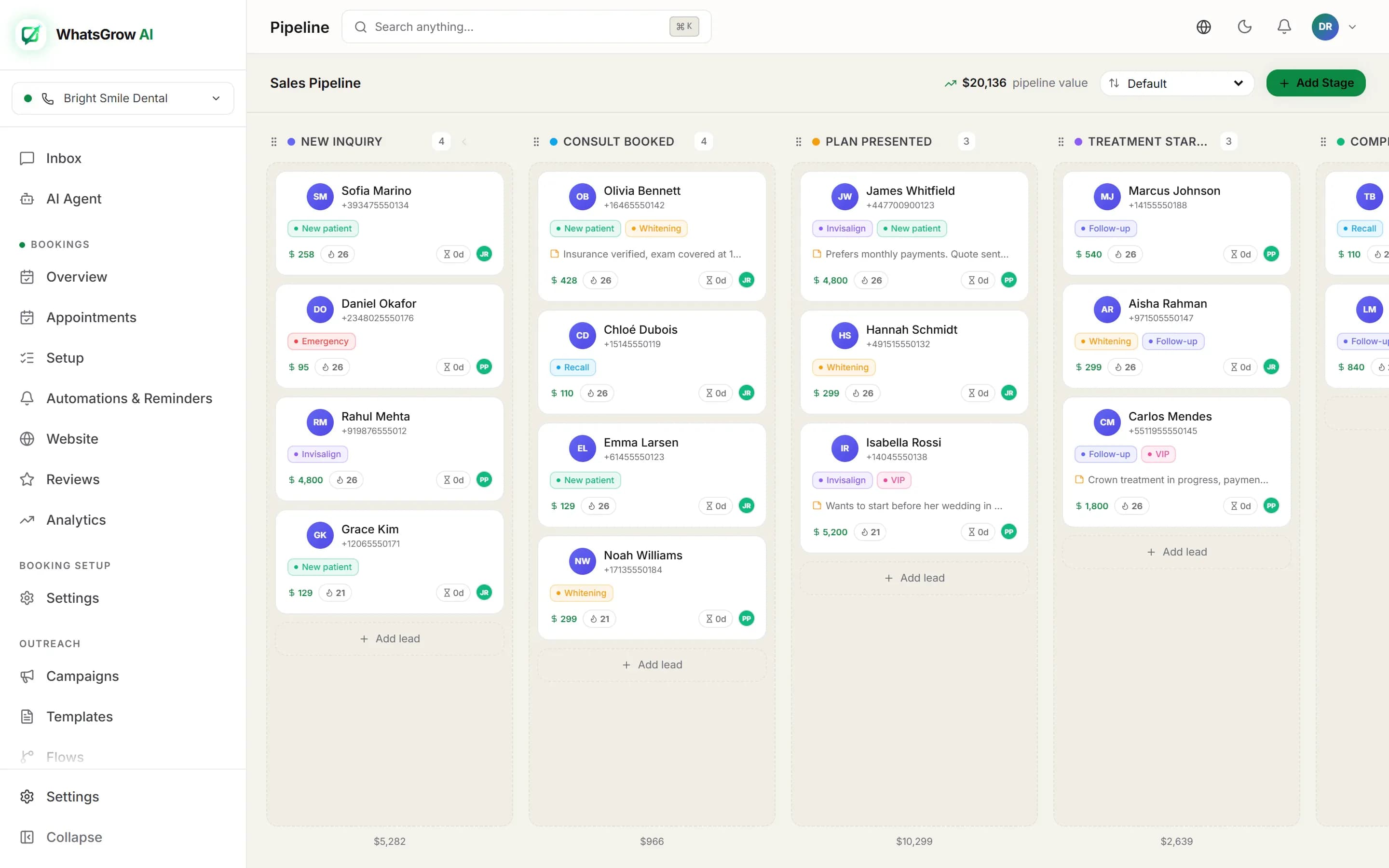
Every WhatsApp lead becomes a card on a board with the stages you define. Cards show the deal value, the owner, open tasks and a lead score, and one click opens the chat. The sales pipeline and the conversation stop living in two tools.

WhatsGrow AI Kanban sales pipeline board with stage columns, lead cards, deal values and pipeline total
The pipeline board: stages as columns, WhatsApp leads as cards, total pipeline value in the header.

What is on a card

Open the board and each lead card carries the context a salesperson needs before they reply.

Deal value

Set a value per lead. The board header totals the pipeline value, and a flow can update the value automatically.

Owner

See who the lead is assigned to, whether by a person, a flow’s round-robin rule or the AI.

Tasks

The card counts open tasks and flags how many are overdue. Create a task straight from the card.

Lead score

A 0 to 100 badge, hot at 70 and above, warm at 40 and above, cold below. Sort a column by score to call the best leads first.

Paid badge

Cards show a Paid badge when a payment link for that contact has been paid, and an average response time so you can spot slow follow-up.

Open chat

Jump from the card to the WhatsApp conversation, with full history and notes, without searching for the contact.

How leads get onto the board and move along

1. Leads arrive. You add a lead from a contact on the board, move a batch of contacts into a stage from the Contacts page, or let a campaign reply create the lead in your first stage. The AI agent and flows can also create the lead when they move a contact into a stage that has none.

2. The conversation does the qualifying. The AI agent asks your qualification questions and, if you enabled the tool, moves the lead when it has what it needs. A flow can do the same with its Move Pipeline Stage and Update Lead Value nodes, or open a task and assign an agent.

3. People work the board. Drag a card to the next stage, change the stage from the contact panel while you chat, and sort the columns by default order, score, value or most recent.

4. Deals close. Mark a deal won or lost. Moving a card into a stage named Won, Closed Won, Lost or Closed Lost sets the outcome too, with a timestamp. The campaigns page then totals revenue from won deals.
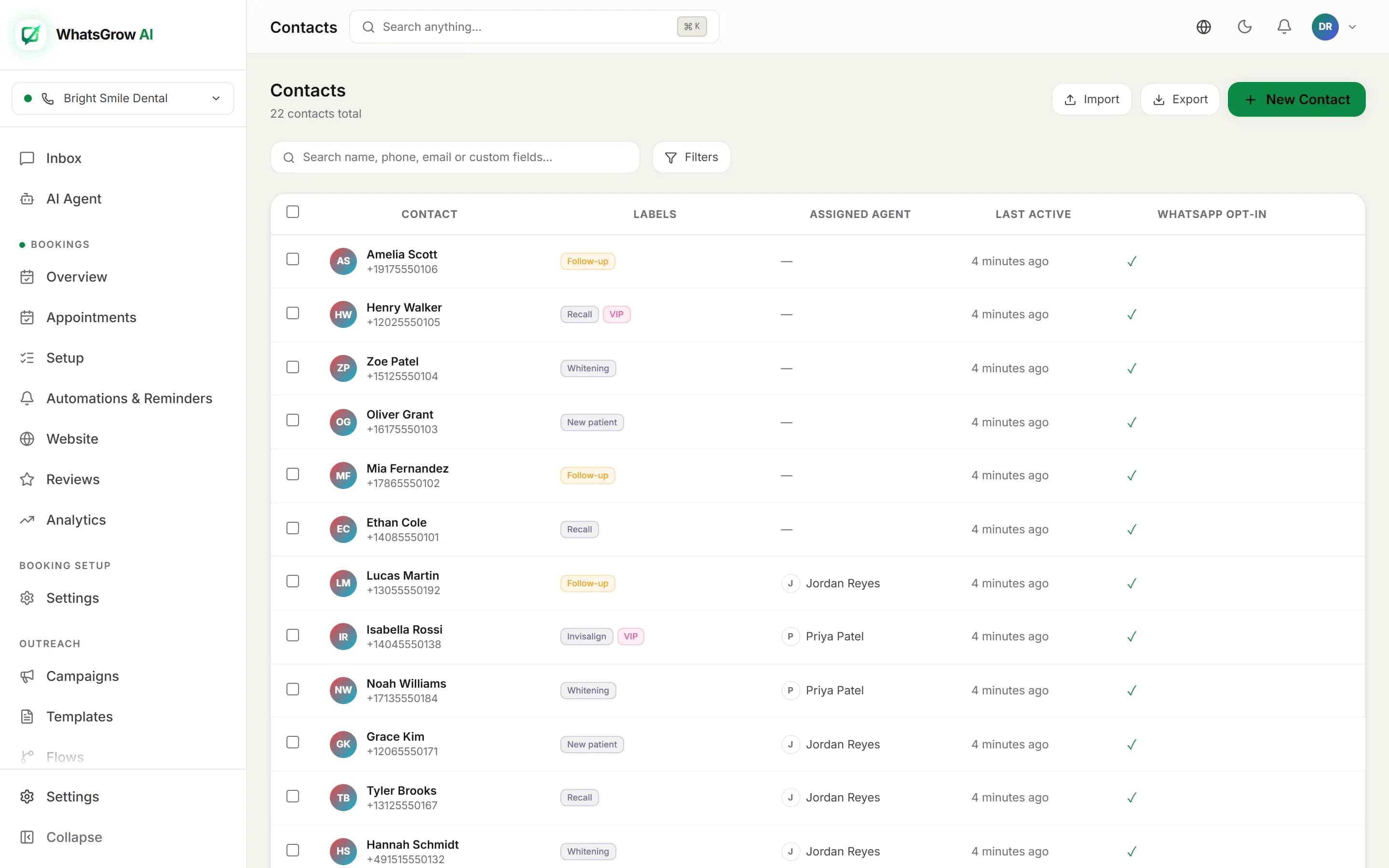
WhatsGrow AI contacts view with labels and custom fields that feed the sales pipeline
Contacts, labels and custom fields sit next to the board, so a lead keeps its history when it changes stage.

Pipelines in practice

Real estate agency

Leads come from Meta ads that open WhatsApp.

  1. 1.Stages: New lead, Qualified, Viewing booked, Offer, Won, Lost.
  2. 2.The AI asks budget and area and moves the card to Qualified.
  3. 3.Sort Qualified by score so the agent calls the hottest buyer first.
  4. 4.A task is created for the viewing; the card shows it as overdue if missed.

Agency selling retainers

Inbound enquiries from the website and referrals.

  1. 1.A keyword flow tags the lead and puts it in Discovery.
  2. 2.Update Lead Value sets a starting retainer figure.
  3. 3.The account lead owns the card and logs notes in the chat.
  4. 4.Pipeline value in the header becomes the monthly forecast number.

Clinic with treatment plans

Patients enquire about multi-session treatment.

  1. 1.Stages: Enquiry, Consultation booked, Plan sent, Started, Lost.
  2. 2.Campaign reply to a check-up reminder creates a lead in the first stage.
  3. 3.Staff drag the card after the consultation and create a follow-up task.
  4. 4.Deals that go quiet are marked lost on the card, keeping the Started column honest.

What the pipeline does not do

Frequently asked questions

What is a WhatsApp CRM pipeline?

It is a board of deals, one column per sales stage, where each card is a WhatsApp contact. Because the board sits in the same product as your WhatsApp inbox, you can open the chat from the card, and a stage change can happen from the chat, from an automation flow or from the AI agent.

Can I set my own pipeline stages?

Yes. You add stages, insert one between two existing stages, drag stages to reorder them or move them left and right, and delete a stage (deleting it also deletes its leads, and the app asks you to confirm). Stage names are yours.

Do leads move between stages automatically?

Not through a rules engine on the board itself. Three things can move them for you: the AI agent (with the stage-move tool enabled), the Move Pipeline Stage node in an automation flow, and a reply to a campaign, which creates a lead in your first stage. Everything else you drag by hand.

How do won and lost deals work?

You can mark a deal won or lost on the card. If you also keep stages named Won, Closed Won, Lost or Closed Lost, moving a card into one of them sets the deal outcome for you.

What is the lead score on a card?

A number from 0 to 100 shown as a badge: 70 and above is labelled hot, 40 to 69 warm and below 40 cold. It is calculated from signals such as how recent and active the conversation is and, where you have captured them, qualification details. You can sort a board by score.

Does the pipeline respect Meta’s 24-hour rule?

The board does not send anything by itself; messages still go through the inbox, flows, AI or campaigns. Meta lets you send free-form replies within 24 hours of the customer’s last message. After that you need an approved template, which is billed per delivered message by Meta.

Go deeper

Our guide to a WhatsApp Kanban pipeline shows stage setups for different businesses, and WhatsApp CRM vs traditional CRM explains when a chat-first tool beats a spreadsheet-style one. See pricing or compare tools before you decide.

Stop losing deals in the chat scroll

Put every WhatsApp lead on a board with an owner and a next step. 7-day free trial.

Start Tracking Leads Free