Glossary

WhatsApp Business API glossary: 28 terms explained

Short, plain definitions of the words you will meet when setting up the WhatsApp Business API, running campaigns and managing leads. Meta rules were checked against Meta's own documentation on 2026-10-16.

No card · cancel anytime

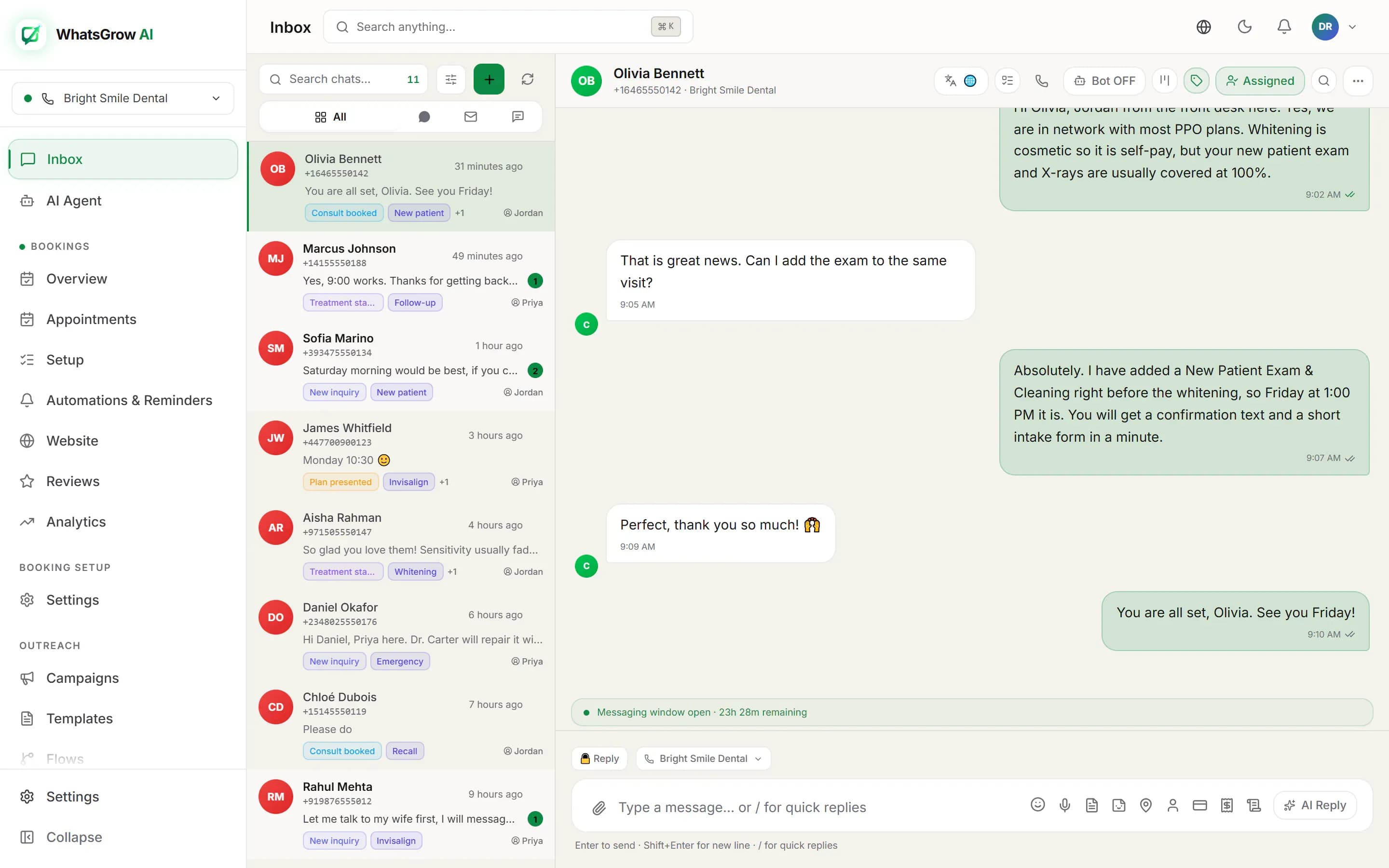
WhatsGrow AI shared inbox: conversation list on the left, an open customer chat with reply box on the right
A to Z

Which WhatsApp Business terms should you know?

These 28 cover the platform itself, how messages are charged and limited, and the CRM side of turning chats into customers. Each entry opens with the answer, then says why it matters.

A

AI agent vs chatbot

A chatbot follows a fixed script: it matches a keyword or button tap and returns a canned reply. An AI agent reads the whole conversation, understands free-form questions, pulls from your knowledge base, and decides what to say or do next, including saving details or booking. Agents handle messy real messages; chatbots break when customers go off script.

Why it matters: The difference decides how many chats get resolved without a human. Scripted bots suit simple menus, agents suit sales and support questions that never repeat word for word.

B

Broadcast

A broadcast is one message sent to many opted-in contacts at once. On the WhatsApp Business API it must go out as an approved template, because most recipients are outside the 24-hour service window. Each recipient gets it as a normal one-to-one chat, and replies land in your inbox.

Why it matters: Broadcasts are the main revenue lever on WhatsApp, and also the fastest way to hurt your quality rating if you send to people who never opted in.

BSP (Business Solution Provider)

A BSP is a company approved by Meta to give businesses access to the WhatsApp Business Platform and add its own software on top, such as an inbox, campaigns and automation. Meta now uses the broader label "Solution Provider" for BSPs and Tech Providers. You sign up with the provider instead of calling Meta directly.

Why it matters: Your provider sets the software fee and handles onboarding, while Meta bills message charges at its published rates. Compare both parts, not just the monthly plan.

C

Catalog

A WhatsApp catalog is a product list attached to your business number, with images, prices and descriptions that customers can browse inside the chat. It is managed through Meta Commerce Manager. You can send single products, multi-product messages or catalog templates, so buyers pick items without leaving the conversation.

Why it matters: Shoppers decide faster when the product is one tap away. It also removes the back-and-forth of sending photos and price lists by hand.

Click-to-WhatsApp ads

Click-to-WhatsApp (CTWA) ads are Facebook and Instagram ads whose button opens a WhatsApp chat with your business instead of a landing page. The person starts the conversation, so the thread begins with consent and intent. Replying to that first message opens a free entry point window.

Why it matters: CTWA turns ad spend into conversations you can follow up and track. Reply fast, because the lead is warmest in the first minutes.

Customer service window (24 hours)

The customer service window is a 24-hour timer that opens when a customer messages you and resets with each new message from them. While it is open you can send free-form, non-template messages. After it closes, you can reach that person only with an approved template message.

Why it matters: It is the rule behind most "why can't I reply?" errors. Build your follow-ups around it, and answer inside the window whenever you can.

F

Free entry point window

A free entry point (FEP) window opens when someone messages you from a click-to-WhatsApp ad on the Android or iOS app and you reply inside the 24-hour service window. It can stay open for up to 7 days from your reply. While it is open, Meta does not charge for marketing, utility, authentication or service messages (Meta Business Agent messages are still charged).

Why it matters: Seven free days gives you room to nurture an ad lead with templates at no message cost. Messages from WhatsApp Web or desktop do not open one, so reply from the app or your CRM within the first 24 hours.

H

Handoff (human takeover)

Handoff is the moment an automated flow or AI agent stops answering and passes the conversation to a person, usually with the chat history and context attached. It can trigger on a keyword, a request for a human, a low-confidence answer or a sensitive topic such as a refund or complaint.

Why it matters: Good handoff is what makes automation safe to switch on. Customers forgive a bot, but not being stuck with one.

I

Interactive messages (buttons and lists)

Interactive messages add tappable elements to a WhatsApp chat: reply buttons (up to three options), list messages (a menu of options) and call-to-action buttons such as open a link. The user taps instead of typing, and your system receives a clean, structured answer.

Why it matters: Taps remove typos and ambiguity, which lifts completion rates for booking, qualification and support menus.

K

Kanban pipeline

A Kanban pipeline shows your leads as cards on a board, one column per sales stage, such as New, Contacted, Quoted and Won. You drag a card forward as the deal progresses. In a WhatsApp CRM each card links to the chat, so the conversation and the stage live in one place.

Why it matters: One glance shows where deals are stuck and which chats need a reply today, which a flat contact list cannot do.

Ready to try it on your own chats?

Start free: 7 days

No card · cancel anytime

L

Lead scoring

Lead scoring gives each contact a number that estimates how likely they are to buy, based on signals such as replies, questions about price, clicks, recency and deal value. Higher scores get attention first. Scores can be set by rules or suggested by AI, and they should be reviewed against what actually closes.

Why it matters: With dozens of open chats, scoring tells your team who to call first, so the hot lead is not buried under casual enquiries.

M

Message templates

Message templates are pre-approved message formats you must use to start a conversation or write to a customer after the 24-hour window. Each has a category, language, body text and optional variables, buttons, header or media. Meta reviews every template before it can be sent, and says a decision can take up to 24 hours.

Why it matters: Templates are the gate to every proactive message. Clear wording and the right category prevent rejections and surprise charges.

Messaging limits (tiers)

Messaging limits cap how many unique customers your business can message outside the service window in a moving 24-hour period. A new business portfolio starts at 250. It can rise to 2,000 through a scaling path, then 10,000, 100,000 and unlimited via automatic scaling. The limit is shared across all numbers in the portfolio.

Why it matters: Your limit decides how large a campaign can be on day one. Plan list size and send order around it, and protect quality to move up.

Meta pixel and Conversions API

The Meta pixel reports browser events to Meta, and the Conversions API (CAPI) sends events from your server. For WhatsApp, CAPI for business messaging lets you report outcomes from a chat, such as a lead qualified or a purchase, back to the ad that started it so Meta can optimize toward real customers.

Why it matters: Without the feedback loop, Meta optimizes for people who chat, not people who buy. Sending outcomes back usually improves ad quality over time.

Meta Verified

Meta Verified is Meta's paid subscription for businesses. It adds a verified badge, impersonation protection and more direct support across Meta apps, where it is available. It is separate from Official Business Account status. Eligibility, features and regional availability are set by Meta and change over time.

Why it matters: A badge builds trust in busy chats, but it is not required to use the API. Treat it as a brand decision, not a technical step.

O

Official Business Account (OBA)

An Official Business Account is a WhatsApp business number that Meta has reviewed and approved as a notable brand, shown with a badge and the verified business name in the chat. It is granted by Meta on request and cannot be switched on by your software provider.

Why it matters: It helps customers trust that the chat is genuine, which matters most for banks, retail and anything involving payments.

On-Premises API (retired)

The On-Premises API was the original WhatsApp Business API, a container you hosted and maintained yourself. Meta retired it: the final supported version (v2.63) expired on October 23, 2025, and it can no longer send messages. Numbers must be registered on the Cloud API instead.

Why it matters: If an old guide or vendor mentions hosting the API on your own server, it is out of date. Every provider now builds on the Cloud API.

Opt-in

Opt-in is a customer's clear permission to receive WhatsApp messages from your business. WhatsApp's Business Messaging Policy requires it before you send proactive messages. Collect it at a web form, checkout, QR code, or by the customer starting a chat, and record when and how consent was given.

Why it matters: Opt-in is the strongest protection for your quality rating and number. Contacts who never asked to hear from you are the ones who block and report.

P

Phone number display name

The display name is the business name customers see on your WhatsApp number. Meta reviews it against naming guidelines, and it should clearly match your brand, with no generic terms or misleading wording. A rejected name can be edited and resubmitted. It is separate from the verified badge.

Why it matters: Customers decide in a second whether a chat looks real. A clear, approved name raises reply rates, and a rejected one can delay your launch.

Q

Quality rating

Quality rating is Meta's score of how recipients receive your messages, shown as green (high), yellow (medium) or red (low). It is driven mainly by blocks, reports and similar feedback from customers recently. A low rating can stop your messaging limit from rising and lead to further restrictions.

Why it matters: It is the one metric you must watch daily. Relevant content to opted-in contacts keeps it green; list blasts push it toward red.

S

Service message (1,000 free a month)

A service message is a free-form, non-template reply you send inside the open 24-hour customer service window. Since October 1, 2026, each business phone number gets 1,000 free service messages a month, and Meta charges from the 1,001st at the service rate for the customer's country. The allowance resets monthly and does not roll over.

Why it matters: For small support volumes this can mean no per-message cost for replies. Replies from AI agents count too. Without a payment method on the account, Meta stops delivering service messages once the free 1,000 are used.

Shared team inbox

A shared team inbox puts one WhatsApp number in front of several agents at once. Chats can be assigned, labelled, noted and transferred, and everyone sees the same history. It replaces passing a phone around or logging into one WhatsApp Business app on several devices.

Why it matters: Response time and accountability depend on knowing who owns each chat. A shared inbox makes both visible.

T

Tech Provider

A Tech Provider is a software company that builds on the WhatsApp Business Platform and onboards business customers through Meta's Embedded Signup flow, so each customer connects its own WhatsApp Business Account. Customers keep ownership of their account, and the provider supplies the software.

Why it matters: Account ownership matters if you ever switch tools. Ask any provider whether the WABA is in your name and whether you can export it.

Template categories

Every message template is filed under one category: marketing (promotions, offers, announcements), utility (order updates, bookings, receipts tied to an action) or authentication (one-time passcodes). Meta decides the final category from the content and may recategorize it. The category sets the price per message.

Why it matters: Promotional text submitted as utility gets recategorized or rejected. Write each template for its true purpose.

W

WABA (WhatsApp Business Account)

A WABA is the container in Meta's system that holds your business phone numbers, message templates, quality ratings and billing setup for the WhatsApp Business Platform. It belongs to a business portfolio in Meta Business Suite. One portfolio can own several WABAs, each with multiple numbers.

Why it matters: Templates and billing attach to the WABA, not the app. Knowing which WABA owns what avoids surprises when you move numbers or change providers.

Webhook

A webhook is a URL on your server that Meta calls whenever something happens: a customer sends a message, a message is delivered or read, or a template status changes. Your system receives the event as JSON, reacts to it, and replies. It is how inboxes and bots stay in sync in real time.

Why it matters: If the webhook breaks, you stop receiving messages. Monitoring it is the first thing to check when chats seem to disappear.

WhatsApp Cloud API

The WhatsApp Cloud API is Meta's hosted interface for sending and receiving WhatsApp messages from software. Meta runs the servers, so there is nothing to host. It is the part of the WhatsApp Business Platform that CRMs, chatbots and broadcast tools connect to.

Why it matters: It is the current standard, so any serious WhatsApp tool you evaluate is built on it. Differences between providers lie in the software on top.

WhatsApp Flows

WhatsApp Flows is a Meta feature that opens a native form inside the chat, with screens, text fields, dropdowns, date pickers and checkboxes. Customers fill it in without leaving WhatsApp, and your system receives the answers as structured data. Typical uses are bookings, lead forms, surveys and sign-ups.

Why it matters: Forms inside the chat finish more often than links to a website, and the data arrives clean. Not to be confused with automation "flows" built in a CRM.

Next steps

Where do you go from here?

If you are still choosing a setup, start with the API setup guide. If you already have a number, the pricing calculator shows what your message volume will cost under Meta's current rules.

Start with your own WhatsApp number

Start free: 7 days

No card · cancel anytime