
WhatsApp CRM guide
WhatsApp CRM: what it is, what it needs, and how to pick one
A WhatsApp CRM puts your customer conversations, contact records and sales pipeline in one workspace on the official Meta Cloud API. This guide covers what to demand, what to skip and what it costs.
No card · cancel anytime
In this guide
What is a WhatsApp CRM?
A WhatsApp CRM is customer-relationship software built around WhatsApp as the main channel. It connects to your WhatsApp number through Meta’s Cloud API and gives your team a shared inbox, a contact record for every chat, a sales pipeline, templates for outbound messages, and usually AI replies.
The idea is simple. In most of the markets we serve, such as Pakistan, India, the UAE, Mexico and Brazil, a lead does not email you. They message you. The chat is where the question, the price, the objection and the “send me the location” all happen. A CRM that makes your agent copy that into a form after the fact is a record-keeping tool. A WhatsApp CRM treats the chat itself as the record.
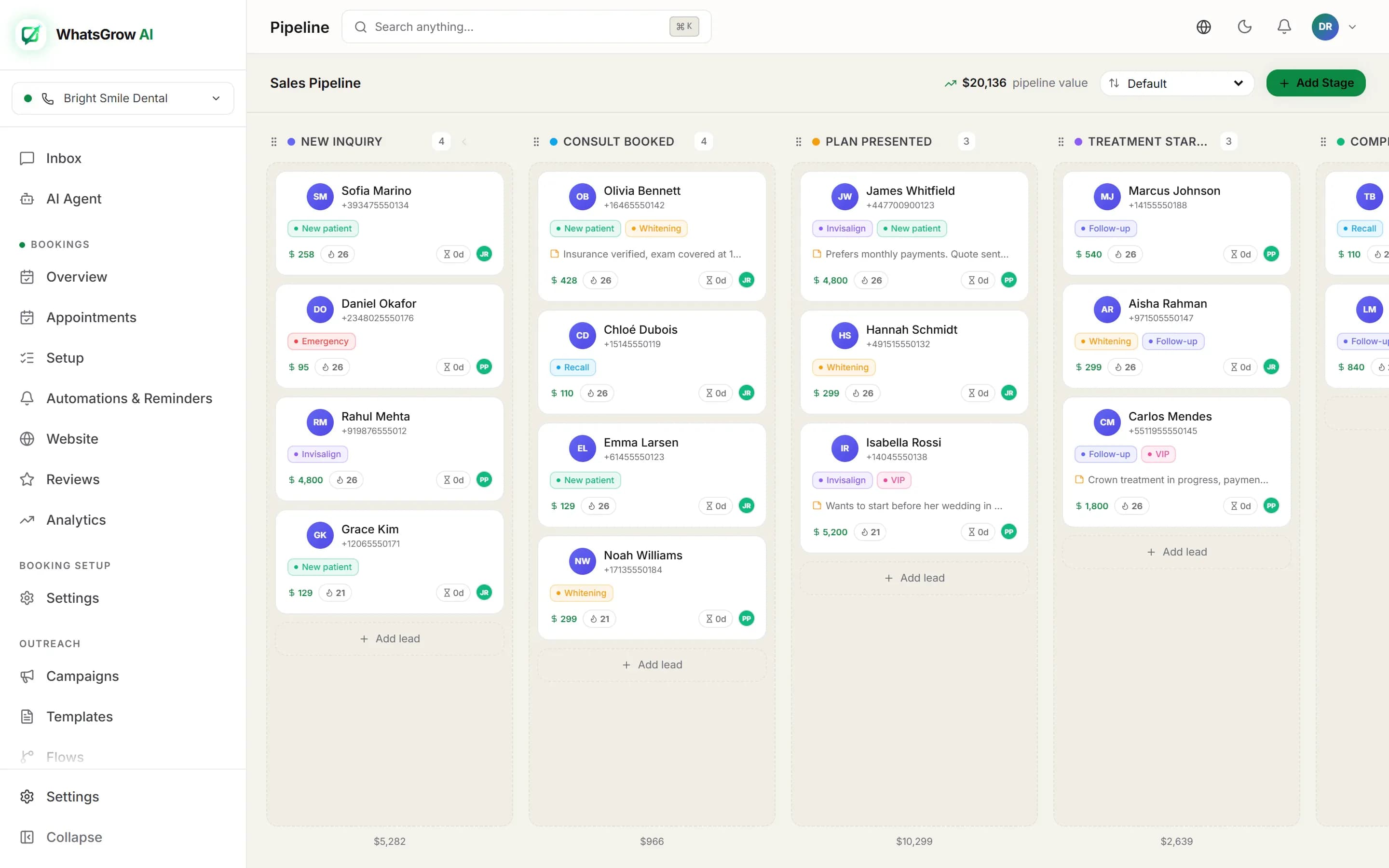
In practice that means four things sit next to each other on one screen: the conversation, the person’s details (name, phone, tags, custom fields, notes), the deal they are part of (stage, value, owner), and the next task. When the customer replies, the card moves or a task appears, and nobody retypes anything.
This is a different product from a chatbot builder and from a bulk-sender. A chatbot builder automates replies. A bulk-sender blasts templates. A CRM remembers who the customer is and what happens next. The better platforms do all three, but when you evaluate one, ask the CRM question first: if I open a contact, can I see everything that happened with them across WhatsApp, and who owns the follow-up?
How is a WhatsApp CRM different from the WhatsApp Business app, the API and a traditional CRM?
The Business app is a phone app for one small team. The API is a raw pipe with no screen. A traditional CRM manages records but treats WhatsApp as an add-on. A WhatsApp CRM sits on the API and adds the inbox, contact records, pipeline and automation that make the pipe usable by a team.
| WhatsApp Business app | Cloud API alone | Traditional CRM | WhatsApp CRM | |
|---|---|---|---|---|
| Who uses it | Owner or one or two staff on phones | Developers | Sales and marketing teams | Sales and support teams that live in chat |
| Team inbox with assignment | No real routing or ownership | Not included, you build it | Usually bolted on per channel | Core feature |
| Contact record per chat | Basic phone contact | None | Yes, but chats are often a side panel | Yes, tied to the thread |
| Sales pipeline | Labels only | None | Strong | Kanban tied to the chat |
| Outbound campaigns | Broadcast lists to people who saved your number | Templates via code | Varies by plan and add-on | Template campaigns with filters |
| AI replies | Away and greeting messages | You integrate a model yourself | Varies | Built in on most modern tools |
| Meta fees | Free | Per delivered message | Per delivered message, plus any BSP margin | Per delivered message, from Meta |
The first column is deliberately blank: this table compares categories, not products. For named tools see the comparison pages and the alternatives hub.
Two clarifications save people a lot of grief. First, a number lives in one place at a time. If it is connected to the Cloud API through a CRM, it generally stops running on the Business app on your phone, unless Meta offers its coexistence option for your account. WhatsGrow AI supports it: Meta offers to link a number without disconnecting the app, subject to Meta’s eligibility rules. Plan the cutover rather than discovering it on a Monday. Second, “traditional CRM” is not a bad answer. If you already live in HubSpot or Salesforce for email, forms and reporting, adding WhatsApp to it can be right. Our WhatsApp CRM vs traditional CRM and WhatsApp CRM vs HubSpot posts put numbers on that trade.
Our opinion: avoid tools that connect by scanning a QR code into a WhatsApp Web session. They are cheap and they work until Meta flags the number. A CRM is the system your revenue runs on, so it should sit on the official API.
Which features does a WhatsApp CRM need?
Nine things matter: a shared inbox with assignment, per-chat contact records with custom fields, a pipeline, approved-template campaigns with opt-in tracking, automation flows, AI replies with human handoff, tasks, a way to take payment, and an export or API so your data is never trapped. Everything else is polish.
Use this as a pass/fail list when you trial a tool. Each line says what to test, not just what to tick.
- Shared inbox with assignment. Assign a chat to an agent, add an internal note, resolve it. Check that two agents cannot reply to the same customer at once without seeing each other. See how our inbox works.
- Contact record with custom fields. Budget, property type, car model, preferred time: whatever your team asks every customer should be a field, not a sentence buried in a thread. Labels or tags alone are not enough.
- Pipeline. A Kanban board whose cards are the conversations. Test moving a deal both by hand and automatically. If the board is a separate tab nobody opens, the pipeline will rot.
- Template campaigns. Outside the 24-hour window you can only send Meta-approved templates. You need template submission inside the tool, audience filters, scheduling and delivery and read numbers. See WhatsApp campaigns.
- Opt-in tracking. Every imported contact should carry an opt-in status, and a campaign should respect it. This protects your quality rating, and with it your sending limits.
- Automation flows. Welcome messages, out-of-hours replies, lead routing, reminders. A visual builder is fine; what matters is conditions on fields and tags. See WhatsApp automation.
- AI with handoff. An AI agent should answer from your own knowledge base, update the contact’s fields, and hand the chat to a human on request. Ask to see a transcript where it says “I don’t know”. See the AI agent.
- Tasks and reminders. Follow-up is where CRMs earn their keep. Every deal needs a next action with a date.
- Payments, calling and escape hatches. Payment links inside the chat close deals faster, and calling matters in markets where customers prefer a voice call. Equally important: CSV export and an API with webhooks. If you cannot leave, you are renting your own customer list.
Nice to have, not essential: a mobile app, WhatsApp group support, multi-language interface, agency white-label. Each becomes essential for a specific kind of team, and the next section is about finding out which kind you are.
How do you choose a WhatsApp CRM by team size, volume and market?
Start from three numbers: how many people answer chats, how many template messages you send a month, and which countries your customers are in. Team size decides seat limits and routing needs, volume decides your Meta bill, and market decides language, payment methods and rates. The table below maps common profiles.
| Your profile | What to prioritise | Watch out for |
|---|---|---|
| Solo owner or 1 to 2 agents, under 500 chats a month | Fast setup, AI answering FAQs, flat price | Per-seat pricing that punishes the second hire. The Business app may still be enough. |
| 3 to 10 agents, a few hundred new leads a month (clinic, real-estate team, school) | Assignment, pipeline, tasks, custom fields, AI qualification | Agent and contact caps by plan; templates re-approved if you migrate numbers |
| 10+ agents, support plus sales | Roles and permissions, SLAs, reporting, API, audit log | Per-contact or per-conversation meters that grow with success. Ask for a full year-two quote. |
| E-commerce store | Shopify or WooCommerce sync, order and cart messages, payment links | Marketing template volume: this is where the Meta bill lives |
| Agency running client workspaces | Multi-tenant admin, separate billing per client, white-label | Tools that make you buy a full account per client |
| India, Pakistan or UAE customers | Local-language AI (Hindi, Urdu, Arabic), local payment methods, regional pricing | Plans quoted in USD with no local currency; support hours that ignore your time zone |
| Mexico, Colombia or Brazil customers | Spanish or Portuguese AI replies, local currency billing, utility templates for reminders | Meta rates differ sharply by country, so check the rate card for your market first |
Then run a 20-question test. Take twenty real customer messages from last month, including the messy ones with voice notes, Roman Urdu or Hinglish, and run them through the tool’s AI and inbox during the trial. A vendor demo is built to succeed. Your own mess is the honest benchmark. Every plan we sell has a 7-day free trial for this reason.
If you want ranked options and named alternatives, read the best WhatsApp CRM software of 2026, WhatsApp CRM comparison, or go straight to the head-to-head pages: WhatsGrow vs Wati, vs AiSensy and vs Respond.io.
Ready to try it on your own chats?
No card · cancel anytime
How do you set up a WhatsApp CRM on the official Cloud API?
You need a Meta business account, a phone number not already registered in a WhatsApp app, an approved display name and a payment method on your WhatsApp Business Account. Connect them through the CRM’s embedded signup, submit templates, import contacts with opt-in status, then configure routing, pipeline and AI.
- Create or find your Meta Business portfolio. You need admin rights. Business verification is optional to start but it raises your messaging limits, and a verified business is easier to trust. See green tick and verification.
- Choose the number. Use a number that can receive a verification call or SMS and is not registered on the WhatsApp or WhatsApp Business app. If it is, either remove it from the app first or, where Meta allows it, link it through coexistence so the app keeps working. Do not pick a personal number you cannot lose.
- Connect through embedded signup. In WhatsGrow AI this is a button in Settings, Channels: you log in with Facebook, pick the business account and number, and the connection is created. No developer work and no manual API tokens.
- Add a payment method in Meta. Meta bills you directly for conversation fees. Meta needs a payment method on the account to deliver paid messages, and since 1 October 2026 it stops delivering service messages once the 1,000 free ones are used up if none is on file. More on this under costs.
- Submit your first five templates. Start with a welcome or follow-up (marketing), an appointment or order confirmation (utility), and a re-engagement message. Submit them from inside the CRM and give each a plain, specific name. Approval can be fast or take longer; do this before you need them.
- Import contacts with their opt-in status. Upload a CSV or Excel file, map columns to name, phone and your custom fields, choose how duplicates are handled, and set the default opt-in. Only message people who agreed to hear from you.
- Set up the team. Add agents, decide who gets new leads, create labels and the pipeline stages that match how you actually sell, not a generic template.
- Turn on the AI agent last. Upload your price list, FAQs and policies as the knowledge base, set the languages, and decide the handoff rule. Test with your twenty real messages. Start in a mode where a human approves replies if the tool offers it.
The step-by-step version with screenshots is in our WhatsApp Business API setup guide. Budget a day of effort and a few days of calendar time, because Meta verification and template approval run on their clock, not yours.
Which integrations does a WhatsApp CRM need?
Only the ones that remove retyping: your store, your spreadsheet, your payment provider and, for bigger stacks, your other CRM through webhooks. In WhatsGrow AI, Shopify and WooCommerce, Google Sheets, Stripe and Razorpay payment links, API keys and webhooks exist today. HubSpot has no native connector.
Searches for “whatsapp crm integration” are usually one of two questions: how do I get WhatsApp into the CRM I already use, or how do I get my store and spreadsheets into a WhatsApp CRM. Here is what we actually offer, so you can plan around it.
| Integration | What it does | Status in WhatsGrow AI |
|---|---|---|
| Shopify | Syncs products, orders and customers; sends order messages and abandoned-cart reminders; lets the AI answer product and order questions | Native, through the e-commerce pack. WooCommerce is supported the same way. |
| Google Sheets | Writes contact fields, including custom fields, to a sheet with one row per contact | Native: connect a Google account, or use a webhook with a paste-ready Apps Script. CSV and Excel import and export also work. |
| HubSpot, Zoho, Pipedrive, Salesforce | Mirror contacts, stages and won deals into your main CRM | No native connector. A custom-field webhook fires when captured details change, a paid-link event fires when a payment lands, a flow step can call any URL, and Zapier or n8n can read pipeline stages through the API. API keys and webhooks need the Growth plan. |
| Stripe and Razorpay | Send a payment link in the chat; the pipeline updates when it is paid | Native. |
| Twilio, RingCentral and Telnyx | Voice calls with history next to the chat, on the Growth plan and above | Native. WhatsApp Business Calling is separate and not available on coexistence numbers. |
The honest summary on HubSpot: if HubSpot is your system of record, run WhatsApp in a WhatsApp-first tool and push stage changes and won deals into HubSpot with a webhook, so each system owns what it is good at. The mechanics, and when HubSpot’s own WhatsApp channel makes more sense, are in WhatsApp CRM vs HubSpot. For e-commerce stacks see WhatsApp chatbot for e-commerce.
What does a WhatsApp CRM cost, including Meta’s fees?
Two separate bills. The CRM subscription is a flat or per-seat fee set by the vendor. Meta’s message fees are charged per delivered message by category (marketing, utility, authentication, service) and by the customer’s country. Since 1 October 2026 service replies are free only for the first 1,000 per business number each month.
For our own plans, see the pricing page; prices are shown in your currency and the plans list no setup fee. Meta’s fees are billed by Meta to your own Meta account, and we add no markup on them. Not every vendor can say that, so ask for the underlying Meta rate beside any per-message price you are quoted.
Meta’s list rates on 1 October 2026 for a marketing template are, in US dollars per delivered message: India 0.0118, North America 0.0250, Mexico 0.0397, Pakistan 0.0473, and the UAE and Saudi Arabia 0.0576. Utility templates cost a fraction of that in most of these countries. Rates change only on 1 January, 1 April, 1 July and 1 October. We keep the full table, worked examples and ways to cut the bill on one page: WhatsApp Business API pricing, and you can plug in your own volumes in the pricing calculator.
The cheapest message is the one Meta does not charge for: a reply inside the free entry-point window after a click-to-WhatsApp ad, or one of the first 1,000 service messages per number each month. A good CRM makes it easy to reply fast enough to use both.
Where should you read next?
Pick the page that matches your situation: a feature page if you want to see how a capability works, a comparison if you are replacing a tool, an industry page if you want a worked setup, or a country guide for local pricing, language and payment realities.
Product features
WhatsApp CRM pipeline
Kanban deals tied to the chat.
WhatsApp AI agent
Knowledge-base replies, field updates, handoff.
WhatsApp automation
Flows, routing and reminders.
WhatsApp campaigns
Template broadcasts with filters.
All features
The full list.
Kanban pipeline guide
How to design stages that get used.
Choosing and switching
Best WhatsApp CRM software
Ten tools ranked.
WhatsApp CRM vs traditional CRM
When each one wins.
WhatsApp CRM vs HubSpot
Cost and setup for a 5-person team.
WhatsApp CRM free trials
What to test in the first week.
Compare WhatsGrow AI
Head-to-head pages.
Alternatives
Switching from another tool.
Wati alternative
Blog guide.
AiSensy alternative
Blog guide.
Respond.io alternative
Blog guide.
Gallabox alternative
Blog guide.
Zixflow alternative
Blog guide.
WhatsApp CRM comparison
Feature and workflow table.
By industry
Solutions hub
Every industry in one place.
Real estate
Portal leads and viewings.
E-commerce
Orders, carts and payments.
Clinics
Appointments and reminders.
Agencies
Multi-client workspaces.
Education
Admissions and fee reminders.
WhatsApp CRM for real estate
Blog guide.
WhatsApp CRM for healthcare
Blog guide.
WhatsApp CRM for agencies
Blog guide.
WhatsApp CRM for education
Blog guide.
WhatsApp CRM for e-commerce
Blog guide.
WhatsApp CRM for restaurants
Blog guide.
By country
Questions people ask
What is the difference between a WhatsApp CRM and a chatbot?
A chatbot automates replies. A WhatsApp CRM remembers the customer: it stores the contact, the conversation history, the deal stage and the next task. Good CRMs include a chatbot or AI agent as one feature, but a chatbot alone cannot tell you who owns a lead or what happened last week.
Is a WhatsApp CRM allowed by WhatsApp?
Yes, if it is built on the official WhatsApp Business Platform (Cloud API) and you follow Meta’s messaging and opt-in policies. Tools that run on an unofficial WhatsApp Web session break those terms and can get your number restricted. Always ask a vendor whether they use the official API.
Can I keep using the WhatsApp Business app on my phone?
Sometimes. A number connected to the Cloud API generally stops working in the app, unless Meta offers coexistence for it. WhatsGrow AI supports coexistence: during connection Meta offers to link the number without disconnecting the app. Eligibility is Meta’s call, and WhatsApp calling is unavailable on coexistence numbers. Check before migrating a number customers already use.
How much does a WhatsApp CRM cost?
You pay a subscription to the CRM vendor plus per-message fees to Meta. WhatsGrow AI’s plans are on the pricing page in your local currency. Meta’s fees depend on the message category and the recipient’s country; see WhatsApp Business API pricing for the October 2026 rates.
Does WhatsGrow AI integrate with HubSpot?
Not with a native connector. Captured contact details can reach HubSpot through the custom-field webhook, paid links through an outbound webhook, and a flow step can call any URL; Zapier or n8n can also read pipeline stages through the API. API keys and webhooks start on the Growth plan. Native integrations that exist today are Shopify, WooCommerce, Google Sheets, Stripe and Razorpay.
How long does setup take?
Connecting a number through embedded signup takes minutes. The rest depends on Meta: business verification and template approval can take days. Plan one working day of your own effort for templates, contact import, pipeline stages and AI training, and a week of calendar time to be safe.
Do I need business verification to use a WhatsApp CRM?
You can start without it, but verified businesses get higher messaging limits and are trusted more by customers. If you plan large campaigns, start verification early because it runs on Meta’s schedule. See our verification guide.
Can an AI agent replace my sales team on WhatsApp?
It can answer common questions, qualify leads and update fields around the clock, but it should hand over to a person for negotiation, complaints and anything it is unsure about. Treat it as the first responder that makes sure no lead waits until morning, not as a closer.
Which is better for a small business, the Business app or a CRM?
If one or two people answer fewer than a few hundred chats a month, the Business app can be enough. Once you need several agents on one number, follow-up tracking, campaigns to opted-in lists or AI replies, a CRM on the Cloud API pays for itself in lost leads avoided.
Sources and method
- Meta: Pricing on the WhatsApp Business Platform (updated 30 Sep 2026, checked 2026-10-17)
- Meta: USD list rates, effective 1 October 2026 (rate card linked from the pricing page, checked 2026-10-17)
- HubSpot knowledge base: Connect a WhatsApp channel to the conversations inbox (last updated 21 July 2026, as cited in our HubSpot comparison)
Try it on your own chats
Connect a number, import a list and run twenty real customer messages through the inbox and the AI agent. The trial is 7 days, no card needed.
No card · cancel anytime