
In this article
Use HubSpot if you already run your marketing, email and reporting in it and WhatsApp is one more channel. Use a WhatsApp-first CRM if most of your revenue conversations happen on WhatsApp and the team needs an inbox, AI replies and a pipeline in one screen. HubSpot's WhatsApp channel is not listed for the free or Starter tiers, and for a 5-person team the cost gap is large before you send a single message.
This post sticks to what HubSpot documents. Where we could not confirm something, we say so.
What does the HubSpot WhatsApp integration require?
HubSpot's own knowledge-base article (last updated 21 July 2026) says the WhatsApp channel is available with Marketing Hub Professional or Enterprise, or Service Hub Professional or Enterprise. Sales Hub is not listed. Free and Starter tiers are not listed either.
How it connects: you add a WhatsApp Business account as a channel in the conversations inbox, and HubSpot walks you through a Meta setup window. You need:
- admin permission on your company's Meta Business Manager account
- your company's legal name, WhatsApp display name, website URL and business email
- a phone number that can receive voice calls, is not behind an IVR, and is not connected to any other WhatsApp account or integration
The limits worth knowing before you buy:
- Only new messages sync. Historical conversations are not imported.
- Once connected, messages stop appearing in the WhatsApp mobile or web app and live in the HubSpot inbox only, unless you use WhatsApp coexistence.
- A cap of 1,000 template messages per month is shared across all connected WhatsApp business accounts. Both business-initiated and user-initiated conversations count toward monthly usage.
- Over 50 business-initiated conversations a day needs a verified Meta Business Manager.
- The 24-hour session rule applies: after it closes you reopen with an approved template.
The inbox is solid. Contacts, companies and deals link to the thread, and you can start a WhatsApp message from a record.
How much does HubSpot WhatsApp cost for a 5-person team?
The cheapest documented route is Service Hub Professional: $90 per seat per month on annual billing ($100 monthly) plus a $1,500 one-time onboarding fee, so five seats cost $6,900 in year one before Meta fees. HubSpot's live pricing page matches these figures (checked 17 Oct 2026).
HubSpot's Service Hub pricing guide (updated 28 Aug 2026) lists Enterprise at $150 per seat with a $3,500 onboarding fee. Marketing Hub Professional starts higher: $800 a month for 3 seats and 2,000 marketing contacts, plus $3,000 one-time onboarding.
| Cost line (5 seats) | HubSpot Service Hub Professional | WhatsApp-first CRM (WhatsGrow AI) |
|---|---|---|
| Seats, annual billing | 5 x $90 x 12 = $5,400/yr | 5 agents fits Growth (10 agents). See pricing in your currency on /pricing |
| Seats, monthly billing | 5 x $100 x 12 = $6,000/yr | Shown on the pricing page in your currency |
| Onboarding | $1,500 one-time | 7-day free trial, no card; check the plan page for any setup fees |
| Year-one total before Meta fees | $6,900 (annual) or $7,500 (monthly) | Your plan price, shown in your currency |
| Template message cap | 1,000/month shared | Meta bills template messages directly; see plan limits on the pricing page |
Meta's per-message fees come on top of both. If the same team also wants HubSpot's marketing automation, the Marketing Hub route costs more again.
How long does setup take?
HubSpot's connection is quick once a verified Meta Business account and a number free of other WhatsApp tools are in place. The slow part is everything around it: a paid Professional subscription, onboarding, Meta template approval, then pipelines and views built to your process. Allow a few days for Meta verification and templates either way.
A WhatsApp-first CRM follows the same Meta path (embedded signup, templates, number migration), but the CRM pieces are already there. In WhatsGrow AI the pipeline, assignment, tasks and AI agent live in the same workspace as the inbox, so there is nothing to build before the first conversation is routed. Meta verification and template approval are not the vendor's to speed up.
Does HubSpot have AI on WhatsApp?
HubSpot's WhatsApp help article documents templates, sessions, inbox views and record-timeline messaging. HubSpot's pricing page lists a credit-based Customer Agent for chat, email, forms and calling, and does not name WhatsApp, so ask HubSpot sales for a live demo on a WhatsApp thread before you count on it.
In WhatsGrow AI, AI agents are part of the product on every plan. They answer from an uploaded knowledge base (Growth and above), reply in languages including Arabic, Hindi, Urdu and Spanish, update contact fields, create tasks, move pipeline stages and send payment links. See the AI agent. The honest test is the same for both: send 20 real customer questions and see what it gets wrong.
Pipeline: HubSpot deals vs a WhatsApp Kanban
HubSpot's deal pipelines, properties, sequences and reporting go far deeper than any WhatsApp-first tool, so choose HubSpot for multi-touch attribution, team forecasting or complex lead scoring. A WhatsApp CRM wins on speed: the deal card sits in the chat, so the pipeline never lags the conversation.
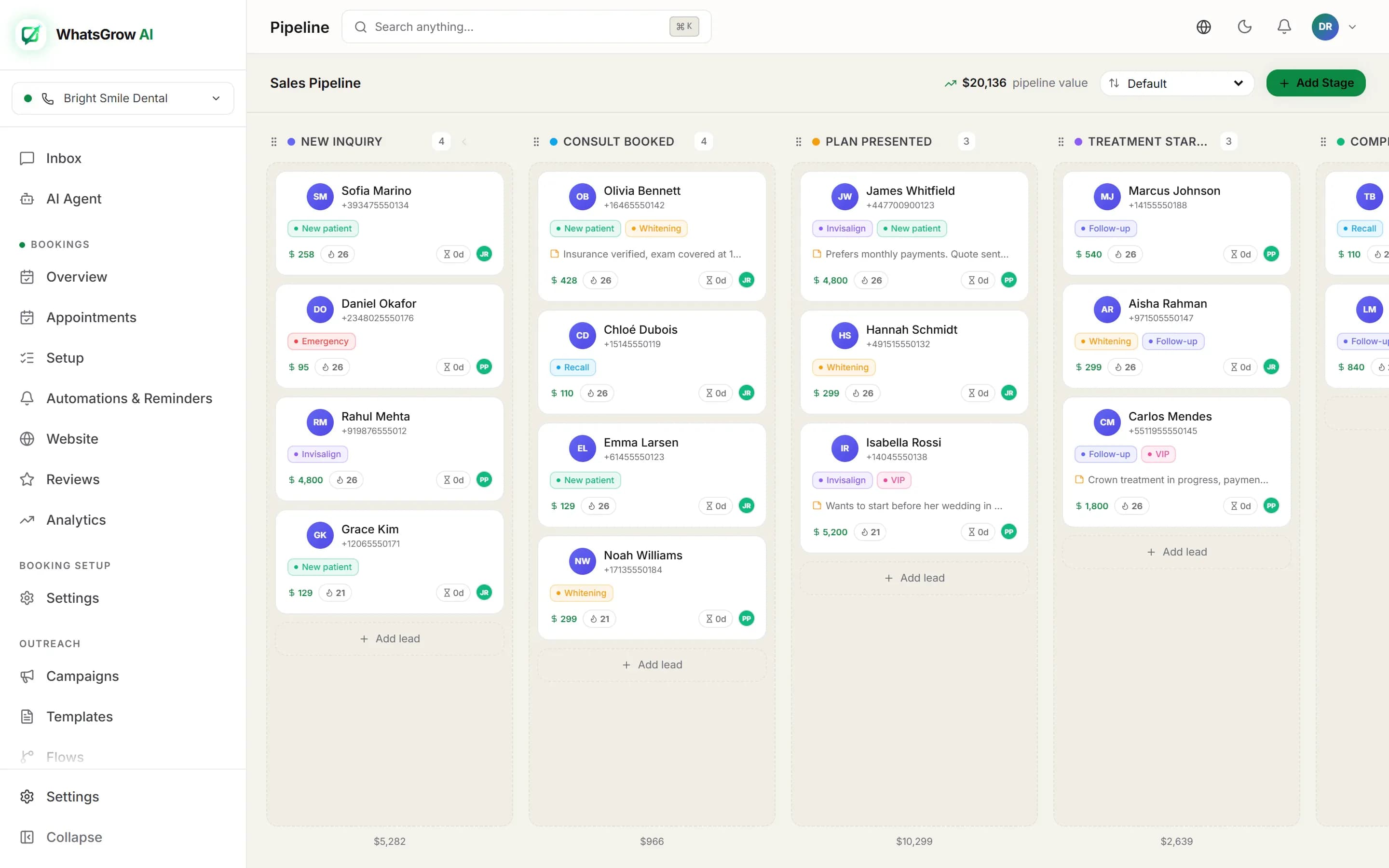
Agents otherwise update the deal by hand after each chat. A WhatsApp CRM puts the card in the chat. In WhatsGrow AI the Kanban pipeline has deal values, assignment and tasks, and the AI can move a lead when it qualifies. Starter has 1 pipeline, Growth 5, Pro 20. Read WhatsApp CRM pipeline and our broader WhatsApp CRM vs traditional CRM guide.
Which should you choose?
Choose HubSpot if email, forms and reporting already run there and WhatsApp is one more channel. Choose a WhatsApp-first CRM when 70 percent or more of leads arrive and close on WhatsApp. Teams sending over 1,000 templates a month should check HubSpot's cap against their plan first.
| If this describes you | Choose |
|---|---|
| You run email, forms, landing pages and reporting in HubSpot already | HubSpot with WhatsApp added |
| You want one vendor, one contact database, one invoice | HubSpot |
| 70 percent or more of leads arrive and close on WhatsApp | WhatsApp-first CRM |
| A 4-agent real-estate team in Dubai getting 300 Meta-ad leads a month | WhatsApp-first CRM: speed to first reply and follow-up discipline matter more than attribution reports |
| You send high template volume (over 1,000 a month) | Check HubSpot's cap against your plan; compare a tool with no plan-level cap |
| Agents need Arabic, Urdu or Hindi AI replies on day one | WhatsApp-first CRM |
If you are mid-way, a related read is the best WhatsApp CRM software, which ranks eight tools.
Can you use both HubSpot and a WhatsApp CRM?
Yes, and for many teams it is the cheapest path. Keep conversations, AI and the working pipeline in the WhatsApp tool, push results into HubSpot for marketing and reporting, and avoid paying for a HubSpot Professional seat for every agent who only chats. It takes a little integration work and a second login.
The steps:
- Webhooks or Zapier/n8n. The custom-field webhook fires when a contact’s captured details change, a paid payment link fires an event, a flow step can call any URL, and a workflow tool can read pipeline stages through the API. Use those to create or update the HubSpot contact and deal. API keys and webhooks start on the Growth plan.
- Define one source of truth. Decide that stage lives in the WhatsApp CRM and lifecycle stage lives in HubSpot, so the two never fight.
- Send marketing consent back. If email nurture runs from HubSpot, pass opt-in status with the contact.
The cost is a small amount of integration work and a second login. The benefit is that you do not need a HubSpot Professional seat for every agent who only chats. Check your HubSpot plan's API access before you design this.
Worked example: 300 Meta-ad leads a month in Dubai
Four agents, 300 leads a month and a manager asking why leads go cold: a WhatsApp-first CRM routes and qualifies each lead the moment it arrives, while HubSpot needs seats, onboarding, a deal pipeline and inbox views built first, and its 1,000-template cap bites by month end. HubSpot wins only where marketing and attribution matter.
The detail: four agents, 300 leads a month from click-to-WhatsApp and lead-form ads, average deal in the tens of thousands of dirhams, and a sales manager who wants to know why leads go cold.
On HubSpot. You buy Service Hub Professional seats, pay onboarding, connect the number through Meta (the number must be free of other WhatsApp tools), build a deal pipeline and a WhatsApp inbox view, and write the rules that create deals from new threads. Each lead that arrives starts a user-initiated conversation, and every template you send to chase a no-reply counts toward the 1,000-a-month cap. Follow-ups to 300 leads, three touches each, is already 900 templates, before reminders for viewings. You will hit the ceiling and need to ask HubSpot what happens beyond it.
On a WhatsApp-first CRM. The lead arrives in the inbox, is assigned, and an AI agent replies instantly in English or Arabic with a qualifying question. The card lands in the pipeline column for new leads; when the buyer shares budget and area, the AI fills the fields and the agent gets a task to call. Nothing to build first.
Where HubSpot would win: the same company runs a Dubai property blog, email newsletters and landing pages with form tracking. Then the shared contact record and attribution reporting justify the price, and the sensible setup is the one described below, with both tools.
What are the hidden costs of the HubSpot route?
Five costs sit outside the seat price: the onboarding fee, seats for people who only chat, the template cap, constraints on the number, and the labour of designing views, workflows and pipelines. None is a reason to avoid HubSpot, but all belong in the price before you compare it with a tool that arrives ready to use.
- Onboarding fee. $1,500 on Service Hub Professional, paid once. That is real money for a team that just needs a WhatsApp inbox.
- Seats for people who only chat. Agents who answer WhatsApp need seats on a subscription that includes the channel, so check how many of your people that is.
- The template cap. 1,000 template messages a month shared across your numbers.
- Connection constraints. The number must accept voice calls and sit outside any IVR. Without coexistence, the mobile WhatsApp app stops showing the chats.
- Setup labour. Views, workflows and pipelines are yours to design. That is the price of flexibility.