
Most WhatsApp CRM tools claim to offer a free trial, but the details vary wildly. Some give you a watered-down free plan that doesn't let you test the features you actually care about. Others give you a genuine time-limited trial with full access. This guide covers exactly what you get with each trial so you can make an informed decision before entering a card.
What to Test During Your WhatsApp CRM Free Trial
Before you sign up for any trial, know what you're testing. The features that matter most:
- AI agents: Does the AI actually understand natural language or just trigger on keywords?
- CRM pipeline: Can you create deal stages and move leads through them?
- Campaign management: Can you send a test campaign to a small list?
- Integration: Does it connect to your existing tools (Shopify, Zapier, etc.)?
- Team inbox: Can you invite another team member and assign conversations?
A trial that doesn't give you access to these features is not a real trial.
1. WhatsGrow AI — Best Free Trial (7 Days, Full Pro Access)
WhatsGrow AI offers the most generous free trial in the category: 7 full days with access to every Pro feature.
What you get during the trial:
- Full AI agent setup (GPT-4o or Gemini, knowledge base, function calling)
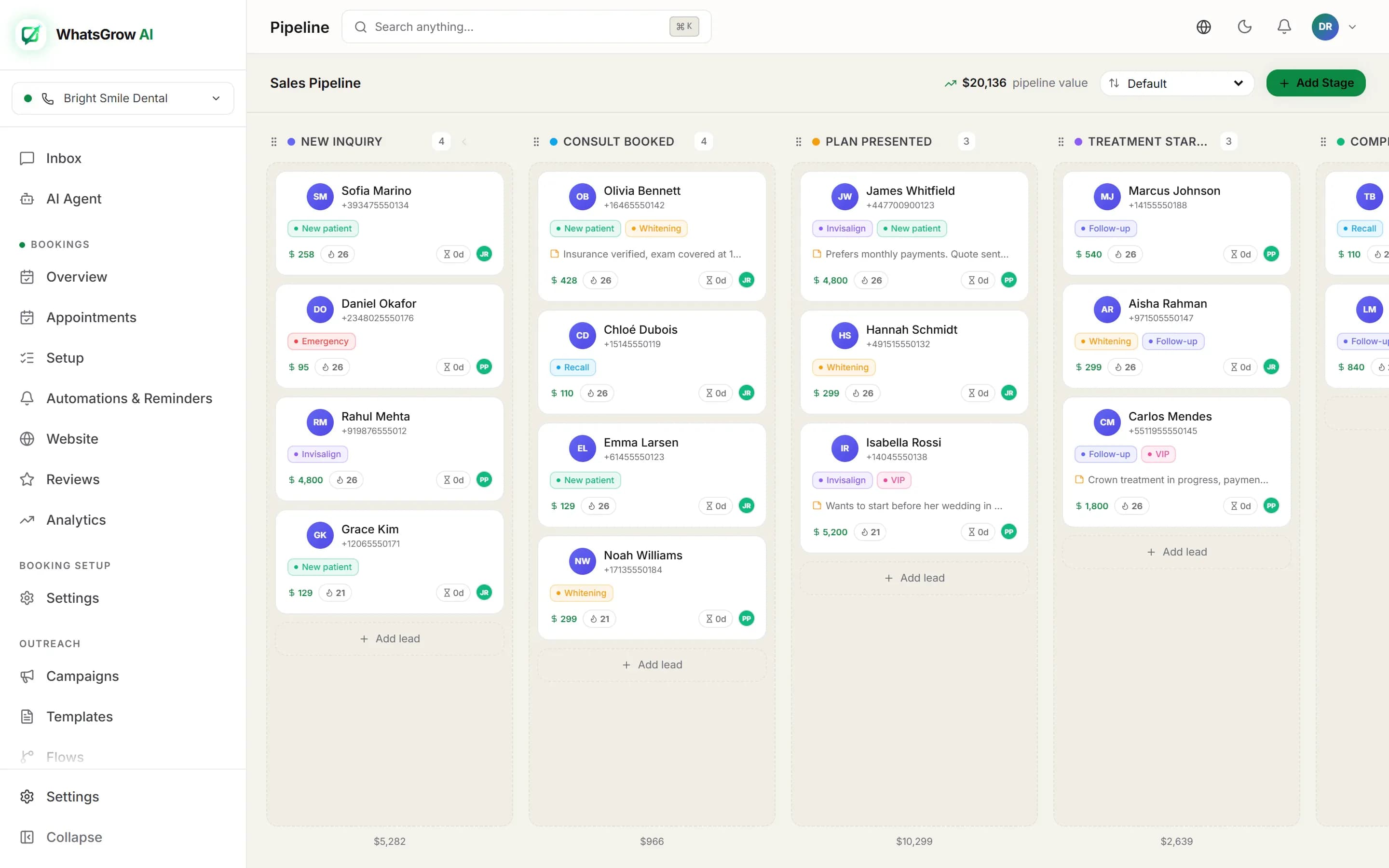
- Kanban CRM pipeline with custom stages
- Bulk campaign management
- Team inbox with multi-agent assignment
- Calling and Razorpay/Stripe payment links
- Developer API and webhook access
No credit card required. No locked features. No usage caps that make testing meaningless.
Start trial: whatsgrowai.com — click Start Free Trial
2. Wati — 7-Day Trial with Limitations
Wati offers a 7-day free trial. Key things to know:
- Basic features available during trial
- AI features may be limited or require upgrade
- No CRM pipeline (Wati doesn't have one anyway)
- Good for testing the shared inbox and basic campaign features
Verdict: Fine for evaluating Wati's core inbox features. Short window.
3. AiSensy — Free Plan (Not a Trial)
AiSensy offers a free plan rather than a time-limited trial. The free plan is very limited:
- Restricted to a small number of contacts
- No AI agents on free plan
- Good for testing the campaign interface at low volume
Verdict: Useful for a preview of AiSensy's campaign features, but you won't see the full product.
4. Respond.io — 7-Day Trial
Respond.io offers a 7-day trial of their Starter plan.
- Omnichannel messaging (WhatsApp, Instagram, Telegram)
- Good AI features available in trial
- Limited to Starter tier features
- Starts at $99/month after trial
Verdict: Worth testing if you need true omnichannel. Expensive post-trial.
5. Interakt — 14-Day Trial
Interakt offers a 14-day trial focused on eCommerce features.
- Shopify/WooCommerce integration testable during trial
- Abandoned cart, order confirmation flows
- Limited CRM and AI features
Verdict: Best trial for eCommerce-specific WhatsApp testing.
What to Check on Day 1 of Your WhatsApp CRM Trial
Make the most of your trial with this checklist:
Day 1 — Setup:
- Connect your WhatsApp number
- Invite one team member
- Create your first AI agent with a system prompt
Day 2-3 — Test AI:
- Send 20 test messages to the AI in different phrasings
- Test in Hindi/Urdu/Arabic if relevant to your market
- Check if AI updates CRM fields correctly
Day 4-7 — Test Pipeline:
- Add 5 test leads to the Kanban pipeline
- Move them through stages
- Check revenue tracking
Day 8-14 — Test Campaigns:
- Create and send a small test campaign
- Check delivery and read rate analytics
- Test Razorpay payment link generation
This methodology gives you a real picture of whether the tool works for your use case before you commit.